
Hosted Payment Page (HPP)
Hosted Payment Page is a fully managed, PCI-compliant checkout. Sensitive payment data never touches your systems. Go live fast, without building or maintaining your own payment form.
Key features
- Prebuilt, secure checkout page: all payment data is collected on a PCI DSS-compliant page.
- Custom branding: apply your logo, colors, and styling for a consistent experience.
- Localization & language support: adapts automatically to your customer's region, with multi-language and multi-currency support.
- Multiple payment methods: accept cards, wallets, and alternative payment methods, depending on your needs.
- Responsive by design: optimized for desktop, tablet, and mobile.
Key benefits
- Simplified PCI DSS compliance: SAQ A only.
- Fastest path to go live: accept online payments with minimal development.
- Secure by architecture: no sensitive data on your servers, reducing risk.
- Seamless flow: customers are redirected back to your site after payment.
- Future-proof: always updated with the latest compliance and payment regulations.
How it works
Hosted Payment Page redirects your customer from checkout to a secure payment page.
Customers enter their payment details there. Once payment completes, they're redirected back to your website, on the forward URL you set up.
Your environment never touches sensitive payment data. That's the model: highest level of security, lowest compliance effort.
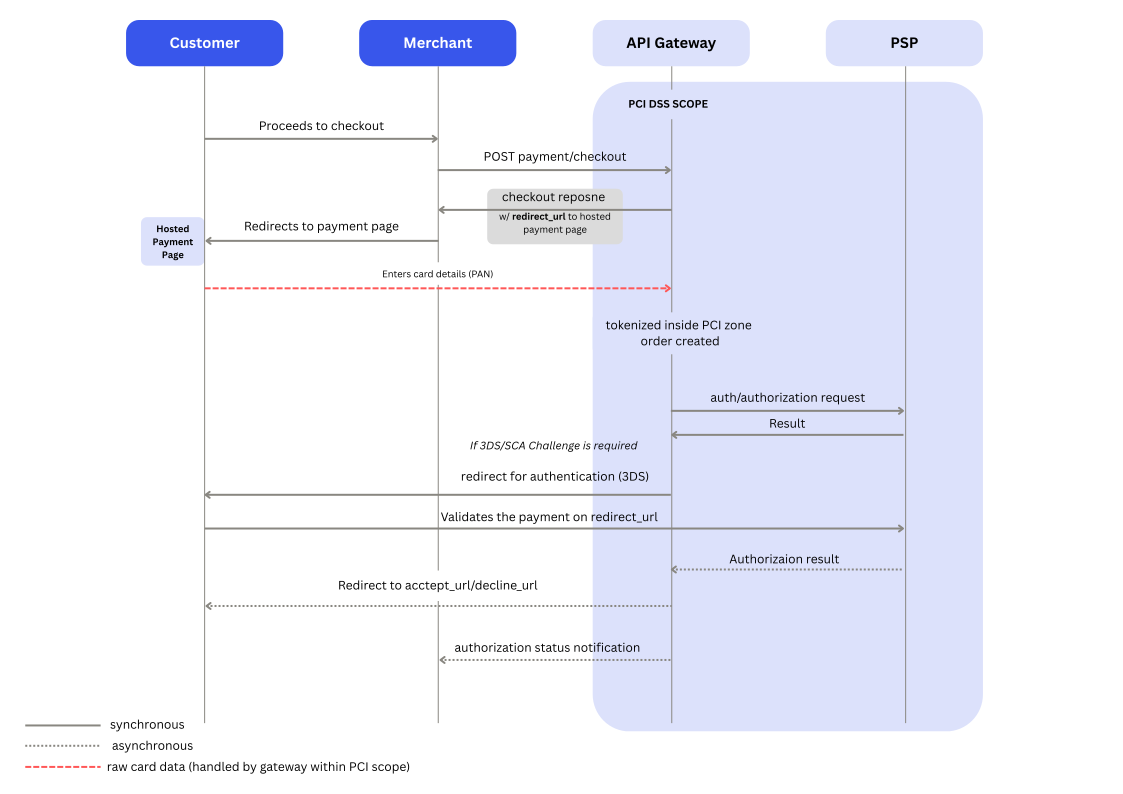
Steps to complete
When you choose Hosted Payment Page as your integration type:
- Point your checkout request to our endpoint
/payment/checkout. See the example below, and the API reference for full detail. - Set your redirect URLs. These send the customer to the right page based on the payment outcome.
- Configure your webhooks, with the required triggers active.
accept_urldecline_urlpending_urlcancel_urlAt minimum, keep these webhook triggers active:
curl --request POST \
     --url https://api-sandbox.norbr.io/payment/checkout \
     --header 'accept: application/json' \
     --header 'content-type: application/json' \
     --header 'x-api-key: your_private_api_key' \
     --data '
{
  "operation_type": "direct_capture",
  "type": "hosted_page",
  "amount": 16,
  "currency": "USD",
  "order_merchant_id": "123445-1abc1-1111-2222-34a56bbb789ccc",
  "payment_channel": "e-commerce",
  "payment_method_type": "card",
  "token_type": "oneshot",
  "accept_url": "https://www.yourwebsite/accepted/order_merchant_id",
  "decline_url": "https://www.yourwebsite/declined/order_merchant_id",
  "pending_url": "https://www.yourwebsite/pending/order_merchant_id",
  "cancel_url": "https://www.yourwebsite/cancel/order_merchant_id",
  "exception_url": "https://www.yourwebsite/exception/order_merchant_id",
  "order_description": "New customer, plan: Premium",
  "device_type": "mobile",
  "customer_email": "[email protected]",
  "customer_ip": "123.999.111.128",
  "locale": "en_US"
}
'
{
"result": {
"code": "011111",
"description": "checkout created successfully"
},
"checkout": {
"decline_url": "https://www.google.com/search?q=decline",
"checkout_id": "68f5dfae5a282ea788f88469",
"exception_url": "https://www.google.com/search?q=exception",
"currency": "USD",
"operation_type": "direct_capture",
"merchant_data": [],
"payment_method_type": "card",
"locale": "en-US",
"pending_url": "https://www.google.com/search?q=pending",
"token_type": "recurring",
"hosted_page_configuration": {
"hosted_fields": {
"display_buttons": false,
"logo_version": "logo_colorbg",
"use_auto_submit": true,
"template_version": "v3",
"display_save": true,
"version": "x.x",
"display_cardholder": true
},
"show_pci_logo": true,
"logo": "",
"host": "host",
"status": "active",
"url": "securepay.test.host.com"
},
"accept_url": "https://www.google.com/search?q=accept",
"customer_ip": "134.199.110.128",
"payment_channel": "e-commerce",
"order_description": "New customer, plan: Premium",
"customer_email": "[email protected]",
"device_type": "mobile",
"cancel_url": "https://www.google.com/search?q=cancel",
"order_merchant_id": "123445-1abc1-1111-2222-34a56bbb789ccc",
"expiration_date": "Mon Oct 20 2025 07:22:26 GMT+0000 (Coordinated Universal Time)",
"payment_method_name": [],
"status": "created",
"customer_browser_info_time_zone": "",
"type": "hosted_page",
"amount": 16
},
"redirect_url": "https://securepay.test.host.com/3927f85d3d9205fb390895520ff8e9351b2a1742171ec927f3927ba0d96f191d",
"payment_methods": {
"payment_methods_saved": [
{
"token": "a1eb111d6cec775af84h909bee0ee72489ded4f8c03e840384830bfd75c038c5a",
"display_name": "Visa",
"form_fields": [
{
"enum": [],
"display_name": "card_number",
"example": "4111 xxxx xxxx xxxx",
"label": "card_number",
"data_type": "integer",
"name": "card_number"
},
{
"enum": [],
"label": "cvc",
"example": "123",
"data_type": "integer",
"display_name": "cvc",
"name": "cvc"
},
{
"enum": [],
"data_type": "date",
"label": "card_validity",
"display_name": "card_validity",
"example": "MM/YY",
"name": "card_validity"
},
{
"enum": [],
"data_type": "name",
"display_name": "cardholder_name",
"example": "Mickael Smith",
"label": "cardholder_name",
"name": "cardholder_name"
}
],
"component_type": "card",
"logo_png": "visa.png",
"logo_whitebg": "Visa_whitebg.svg",
"logo_favicon_whitebg_png": "[email protected]",
"nb_use": 1,
"logo_favicon_whitebg": "Visa_favicon_whitebg.svg",
"required_fields": [
"payment_method_name",
"token",
"amount",
"currency"
],
"logo": "visa.svg",
"countries": [
"all"
],
"logo_white": "Visa_white.svg",
"logo_whitebg_png": "[email protected]",
"logo_favicon_colorbg_png": "[email protected]",
"logo_favicon_colorbg": "Visa_favicon_colorbg.svg",
"logo_white_png": "[email protected]",
"logo_colorbg": "Visa_colorbg.svg",
"logo_colorbg_png": "[email protected]",
"id": {},
"date_last_use": "Sun Aug 31 2025 22:01:44 GMT+0000 (Coordinated Universal Time)",
"partner": "trustpay",
"payment_details": [
{
"key": "last_4_digits",
"value": "0741"
},
{
"value": "470793",
"key": "first_6_digits"
},
{
"key": "card_validity_month",
"value": "07"
},
{
"key": "card_validity_year",
"value": "28"
},
{
"value": "Thomas farrington",
"key": "card_holder_name"
}
],
"name": "visa"
},
{
"logo_colorbg": "Mastercard_colorbg.svg",
"token": "7a64e8aba0c9eeb585d7e29e089b1ba110b5a9ff77f9053ce95ea4f9153311c9",
"logo_white": "Mastercard_white.svg",
"logo_png": "mastercard.png",
"name": "mastercard",
"logo_favicon_whitebg": "Mastercard_favicon_whitebg.svg",
"partner": "finaro",
"logo_favicon_whitebg_png": "[email protected]",
"logo": "mastercard.svg",
"display_name": "Mastercard",
"logo_favicon_colorbg": "Mastercard_favicon_colorbg.svg",
"id": {},
"required_fields": [
"payment_method_name",
"token",
"amount",
"currency"
],
"logo_white_png": "[email protected]",
"countries": [
"all"
],
"form_fields": [
{
"label": "card_number",
"data_type": "integer",
"example": "5436 xxxx xxxx xxxx",
"display_name": "card_number",
"enum": [],
"name": "card_number"
},
{
"data_type": "integer",
"label": "cvc",
"display_name": "cvc",
"enum": [],
"name": "cvc",
"example": "123"
},
{
"label": "card_validity",
"example": "MM/YY",
"enum": [],
"display_name": "card_validity",
"data_type": "date",
"name": "card_validity"
},
{
"label": "cardholder_name",
"example": "Mickael Smith",
"display_name": "cardholder_name",
"data_type": "name",
"name": "cardholder_name",
"enum": []
}
],
"nb_use": 1,
"logo_whitebg_png": "[email protected]",
"component_type": "card",
"logo_favicon_colorbg_png": "[email protected]",
"logo_whitebg": "Mastercard_whitebg.svg",
"date_last_use": "Sun Aug 31 2025 05:32:14 GMT+0000 (Coordinated Universal Time)",
"payment_details": [
{
"key": "last_4_digits",
"value": "0999"
},
{
"value": "515354",
"key": "first_6_digits"
},
{
"value": "05",
"key": "card_validity_month"
},
{
"value": "28",
"key": "card_validity_year"
},
{
"value": "Thomas farrington",
"key": "card_holder_name"
}
],
"logo_colorbg_png": "[email protected]"
}
],
"payment_methods_used": [
{
"display_name": "Mastercard",
"logo_whitebg_png": "[email protected]",
"logo_favicon_whitebg": "Mastercard_favicon_whitebg.svg",
"required_fields": [
"payment_method_name",
"token",
"amount",
"currency"
],
"component_type": "card",
"logo_favicon_whitebg_png": "[email protected]",
"nb_use": 123,
"logo_colorbg": "Mastercard_colorbg.svg",
"partner": "finaro",
"logo_favicon_colorbg": "Mastercard_favicon_colorbg.svg",
"name": "mastercard",
"logo_favicon_colorbg_png": "[email protected]",
"logo_white_png": "[email protected]",
"logo_whitebg": "Mastercard_whitebg.svg",
"logo_png": "mastercard.png",
"logo": "mastercard.svg",
"logo_colorbg_png": "[email protected]",
"countries": [
"all"
],
"logo_white": "Mastercard_white.svg",
"form_fields": [
{
"data_type": "integer",
"label": "card_number",
"enum": [],
"display_name": "card_number",
"name": "card_number",
"example": "5436 xxxx xxxx xxxx"
},
{
"data_type": "integer",
"label": "cvc",
"enum": [],
"display_name": "cvc",
"name": "cvc",
"example": "123"
},
{
"name": "card_validity",
"enum": [],
"label": "card_validity",
"display_name": "card_validity",
"example": "MM/YY",
"data_type": "date"
},
{
"enum": [],
"example": "Mickael Smith",
"label": "cardholder_name",
"name": "cardholder_name",
"data_type": "name",
"display_name": "cardholder_name"
}
],
"date_last_use": "Mon Oct 20 2025 06:48:31 GMT+0000 (Coordinated Universal Time)"
},
{
"nb_use": 35,
"date_last_use": "Sat Oct 18 2025 23:30:18 GMT+0000 (Coordinated Universal Time)",
"countries": [
"all"
],
"logo_white_png": "[email protected]",
"component_type": "card",
"logo": "visa.svg",
"logo_colorbg_png": "[email protected]",
"logo_whitebg_png": "[email protected]",
"logo_white": "Visa_white.svg",
"display_name": "Visa",
"logo_whitebg": "Visa_whitebg.svg",
"form_fields": [
{
"display_name": "card_number",
"example": "4111 xxxx xxxx xxxx",
"name": "card_number",
"label": "card_number",
"data_type": "integer",
"enum": []
},
{
"example": "123",
"display_name": "cvc",
"label": "cvc",
"enum": [],
"name": "cvc",
"data_type": "integer"
},
{
"example": "MM/YY",
"data_type": "date",
"display_name": "card_validity",
"label": "card_validity",
"enum": [],
"name": "card_validity"
},
{
"name": "cardholder_name",
"data_type": "name",
"enum": [],
"label": "cardholder_name",
"example": "Mickael Smith",
"display_name": "cardholder_name"
}
],
"logo_favicon_colorbg": "Visa_favicon_colorbg.svg",
"logo_colorbg": "Visa_colorbg.svg",
"logo_png": "visa.png",
"logo_favicon_colorbg_png": "[email protected]",
"logo_favicon_whitebg_png": "[email protected]",
"name": "visa",
"logo_favicon_whitebg": "Visa_favicon_whitebg.svg",
"partner": "trustpay",
"required_fields": [
"payment_method_name",
"token",
"amount",
"currency"
]
}
],
"payment_methods_available": [
{
"logo_colorbg": "Visa_colorbg.svg",
"required_fields": [
"payment_method_name",
"token",
"amount",
"currency"
],
"logo_png": "visa.png",
"logo": "visa.svg",
"display_name": "Visa",
"logo_white_png": "[email protected]",
"logo_whitebg": "Visa_whitebg.svg",
"logo_favicon_whitebg_png": "[email protected]",
"logo_favicon_colorbg": "Visa_favicon_colorbg.svg",
"partner": "trustpay",
"component_type": "card",
"logo_colorbg_png": "[email protected]",
"logo_white": "Visa_white.svg",
"logo_favicon_colorbg_png": "[email protected]",
"logo_favicon_whitebg": "Visa_favicon_whitebg.svg",
"logo_whitebg_png": "[email protected]",
"name": "visa",
"form_fields": [
{
"example": "4111 xxxx xxxx xxxx",
"data_type": "integer",
"display_name": "card_number",
"label": "card_number",
"name": "card_number",
"enum": []
},
{
"name": "cvc",
"data_type": "integer",
"display_name": "cvc",
"enum": [],
"example": "123",
"label": "cvc"
},
{
"name": "card_validity",
"display_name": "card_validity",
"data_type": "date",
"example": "MM/YY",
"enum": [],
"label": "card_validity"
},
{
"enum": [],
"example": "Mickael Smith",
"label": "cardholder_name",
"name": "cardholder_name",
"display_name": "cardholder_name",
"data_type": "name"
}
],
"countries": [
"all"
]
},
{
"logo_png": "mastercard.png",
"form_fields": [
{
"data_type": "integer",
"label": "card_number",
"display_name": "card_number",
"enum": [],
"name": "card_number",
"example": "5436 xxxx xxxx xxxx"
},
{
"example": "123",
"data_type": "integer",
"enum": [],
"display_name": "cvc",
"label": "cvc",
"name": "cvc"
},
{
"name": "card_validity",
"data_type": "date",
"enum": [],
"example": "MM/YY",
"label": "card_validity",
"display_name": "card_validity"
},
{
"name": "cardholder_name",
"example": "Mickael Smith",
"enum": [],
"label": "cardholder_name",
"data_type": "name",
"display_name": "cardholder_name"
}
],
"display_name": "Mastercard",
"logo_favicon_colorbg_png": "[email protected]",
"logo_whitebg": "Mastercard_whitebg.svg",
"logo_white_png": "[email protected]",
"countries": [
"all"
],
"logo_favicon_whitebg": "Mastercard_favicon_whitebg.svg",
"logo_colorbg_png": "[email protected]",
"logo": "mastercard.svg",
"logo_white": "Mastercard_white.svg",
"partner": "finaro",
"logo_colorbg": "Mastercard_colorbg.svg",
"logo_favicon_whitebg_png": "[email protected]",
"name": "mastercard",
"required_fields": [
"payment_method_name",
"token",
"amount",
"currency"
],
"logo_favicon_colorbg": "Mastercard_favicon_colorbg.svg",
"component_type": "card",
"logo_whitebg_png": "[email protected]"
},
{
"logo": "maestro.svg",
"logo_favicon_whitebg": "Maestro_favicon_whitebg.svg",
"required_fields": [
"payment_method_name",
"token",
"amount",
"currency"
],
"logo_favicon_colorbg_png": "[email protected]",
"logo_whitebg": "Maestro_whitebg.svg",
"logo_png": "maestro.png",
"logo_favicon_colorbg": "Maestro_favicon_colorbg.svg",
"name": "maestro",
"component_type": "card",
"partner": "trustpay",
"form_fields": [
{
"example": "5600 xxxx xxxx xxxx xxx",
"display_name": "card_number",
"enum": [],
"data_type": "integer",
"name": "card_number",
"label": "card_number"
},
{
"name": "cvc",
"example": "123",
"enum": [],
"data_type": "integer",
"display_name": "cvc",
"label": "cvc"
},
{
"enum": [],
"display_name": "card_validity",
"example": "MM/YY",
"data_type": "date",
"name": "card_validity",
"label": "card_validity"
},
{
"display_name": "cardholder_name",
"name": "cardholder_name",
"example": "Mickael Smith",
"label": "cardholder_name",
"data_type": "name",
"enum": []
}
],
"display_name": "Maestro",
"logo_whitebg_png": "[email protected]",
"logo_white_png": "[email protected]",
"logo_white": "Maestro_white.svg",
"logo_favicon_whitebg_png": "[email protected]",
"countries": [
"all"
],
"logo_colorbg": "Maestro_colorbg.svg",
"logo_colorbg_png": "[email protected]"
}
]
}
} Available languages
You can adjuste the language of the hosted page by sending the respective locale in the checkout request.
The available values are:
HPP example
Below is the default look of the hosted page, showing the payment methods your customer can choose from. These correspond to your active payment methods.
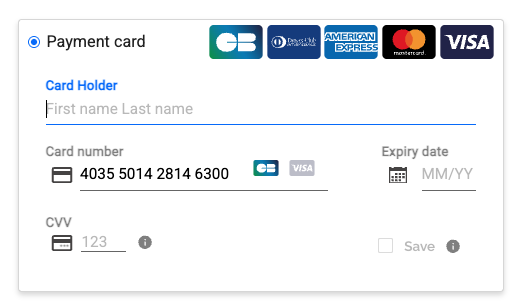
Hosted Payment Page example: default look
HPP activation & customization
Go with the default look above, customize the main elements, or fully customize the page. Your choice.
How to activate
-
Log into your account.
-
Navigate to API & Notifications in the Integration section on the left.
-
If you have more than one merchant account, select the one you're configuring.
-
Go to Hosted Page → Settings.
-
Fill in Host and URL — we provide them.
-
Choose what to display: PCI logo, pay button per payment type, and more.
-
Set status to active.
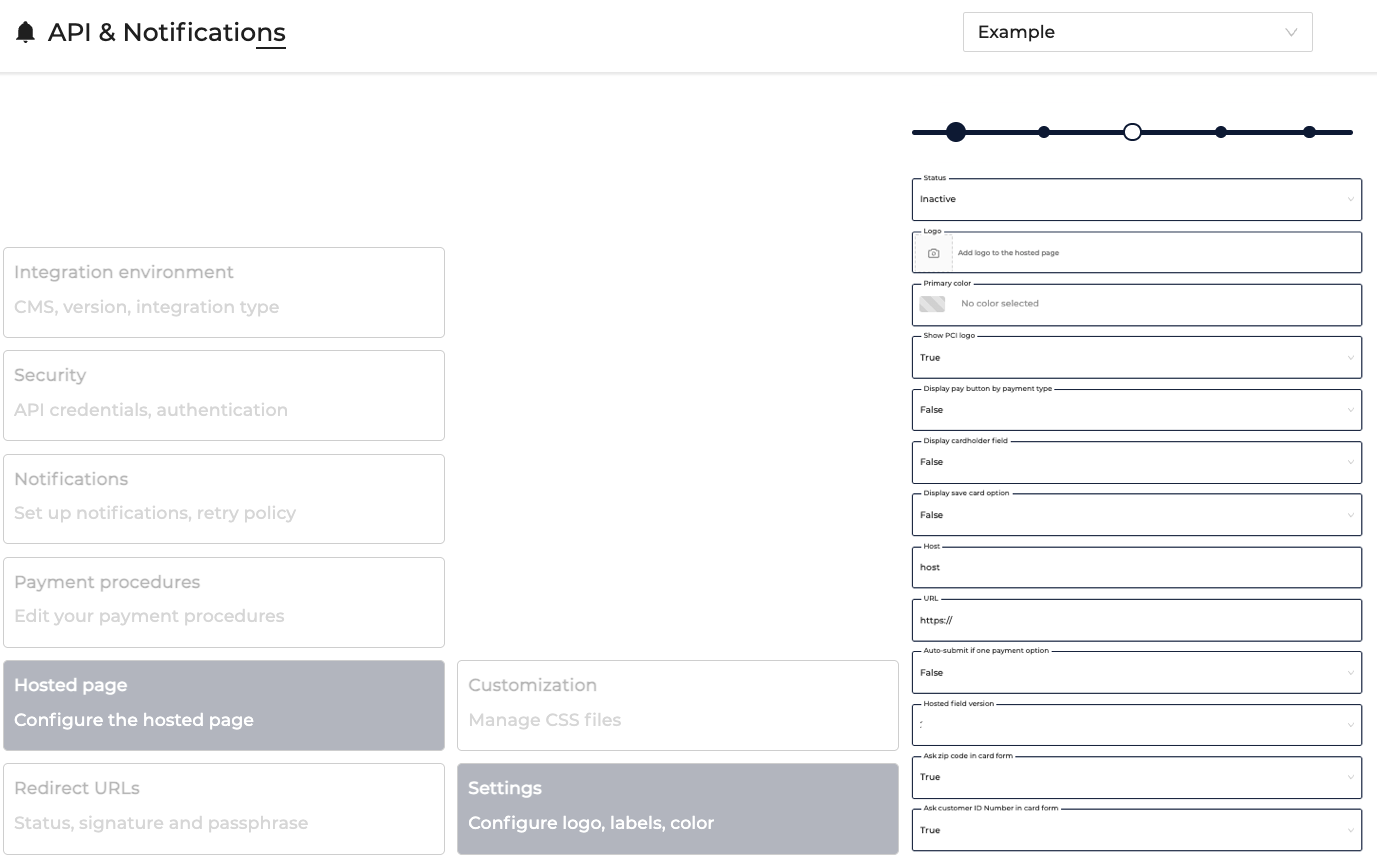
How to customize
-
Log into your account.
-
Navigate to API & Notifications in the Integration section on the left.
-
If you have more than one merchant account, select the one you're configuring.
-
Go to Hosted Page:
- Settings to customize (and activate) your HPP.
- Customization to fully control the look with your own CSS file.
In Settings, customize your logo, primary color, whether the PCI button displays, and which fields show.
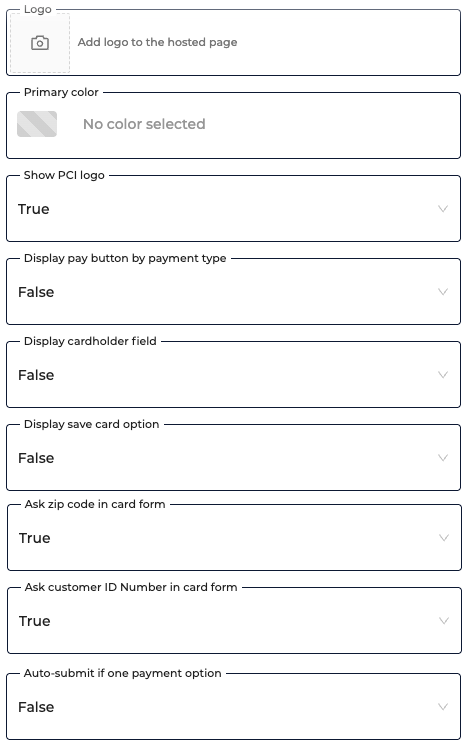
In Customization, upload your CSS file for full control over the look.

Before you test
Before testing, go through our Getting Started guide to cover:
- Where to get your API keys
- How to set up your webhooks
- Return codes and what they mean
- Our go-live checklist
Testing
Head to Testing — Hosted Payment Page Integration for a step-by-step guide to your first transaction.
Updated 26 days ago